Celestron NexYZ Smartphone AdapterAccessory for the Celestron Nexstar 6SE$80.95, Eyepiece Clamp Range: 35mm - 60mm (1.37" - 2.36")
Phone Clamp Style: Easy load with internal spring
Phone Clamp Range: 65mm - 90mm (2.55" - 3.54")
Dimensions: 165.1mm x 139.7mm x 107.95mm (6.50" x 5.50" x 4.25")
Weight: 10 oz ( 283 g)
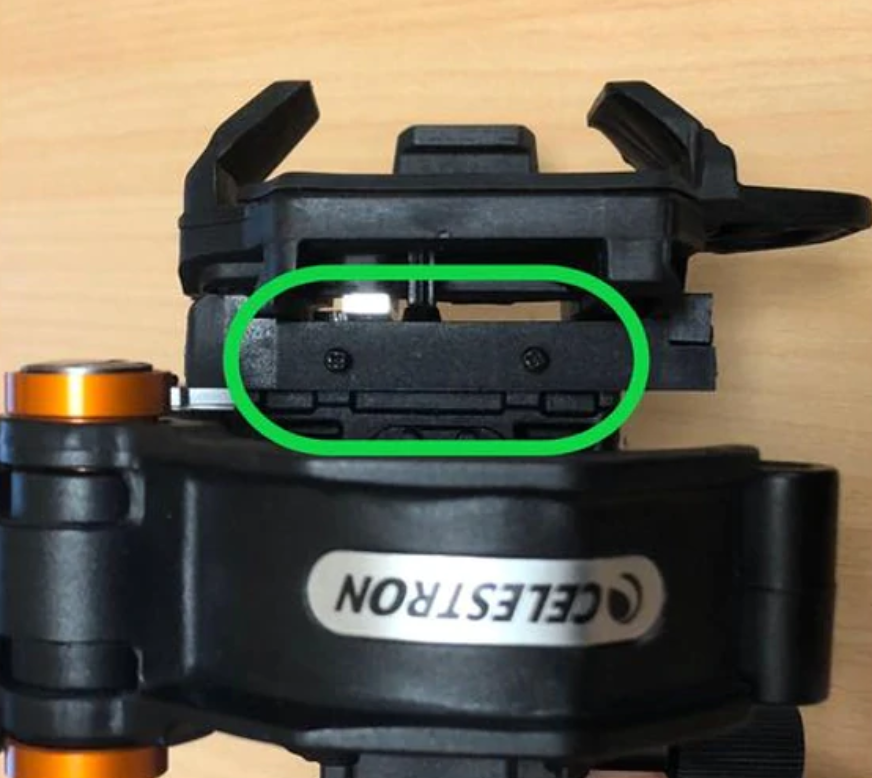
The advertising claimed to adjust the cell phone in all three directions and the reviews were good so this accessory was purchased. However, the unit is not adjusted and had slop out of the box. It was unknown if this is the way it worked or if it had adjustment points. A bit of experimenting discovered sets of tiny phillips screws that could calibrate the tension and take up any play in the axes.
To accomplish this, look for a matching set of two screws that may not be screwed in all the way, at each axis. Tighten the screws using a very small #1 precision Chinese phillips screwdriver from a set sold in China to get the proper depth screwdriver. Then test by turning the adjustment knobs. The knob should turn firm but not too tight or too loose. This will take up the play along the gear rack and the overall smartphone adapter will become firm and tight as it holds and adjusts the phone.
The adapter is a bit heavy but considering what it can do along three axes where others are made of lightweight plastic and can only adjust along two axes, it appears to be an excellent investment.
The tension of each axis can be easily adjusted using a small Phillips screwdriver. Use the images below to locate the adjusting screws. For each axis, only make small adjustments to the set screws. Tightening them too much can make it difficult to use the motion knobs. In between the platform and adapter, there will be screws for tension adjustment in the X axis.
(NOTE: For NexYZ, make sure to adjust the Z axis until the phone platform is as far away from the adapter as possible). Y Axis – On the side of the phone bed holder platform, there will be screws for tension adjustment in the Y axis.
Underneath the handle will be two set screws for tension adjustment in the Y axis. Z Axis – (NexYZ only) Directly on the opposite side of the Z axis motion knob are the set screws for tension adjustment in the Z Axis. This adjustment is very useful for heavy smartphones.
NexYZ connects your smartphone to your telescope, spotting scope, binocular, monocular, and microscope so you can capture images and video through the eyepiece. Works with a wide range of mobile phone models, including all the latest devices from Samsung, Google, and Apple.
Unlike other adapters, NexYZ features 3 directional knobs (X, Y, and Z axis) that perfectly align your phone’s camera with
the eyepiece in seconds so you are ready to snap the perfect image; In addition, you can make tension adjustments to keep the phone firmly in place. NexYZ stands up to rigorous field use thanks to its robust, durable construction with a metal frame and polymer body.
NexYZ fits any eyepiece from 35 millimeter to 60 millimeter in diameter including telescopes with 1.25 inch and 2 inch eyepieces.
Another good accessory to have is a battery powered Bluetooth Remote Shutter to automatically take the exposures without touching the camera and preventing the introduction of vibrations.
These are usually keychain size devices that operate on a 3 volt button battery. Go to settings on the iPhone and select Bluetooth, then find the device and connect. Thereafter, use the pushbutton switch on the device to activate the camera's shutter and take the photo.